

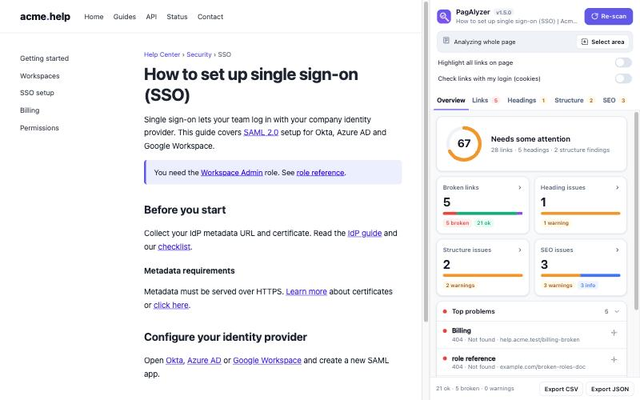
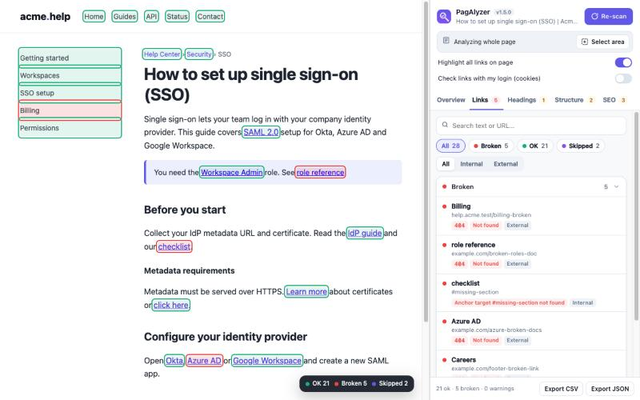
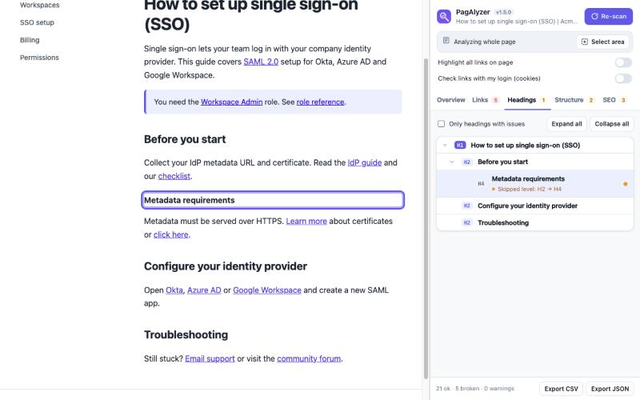
PagAlyzer audits the page you're on, right from a side panel. Scan, see what's wrong, and click any finding to jump to it on the page.
Features
Broken links
- Checks every link on the page and flags 404s, server errors, unreachable hosts, broken
#anchors, empty andjavascript:links. - Highlights every link on the page as OK, broken or warning.
- Click any link in the panel to scroll to it and highlight it on the page.
- Filter by status, internal or external, or search.
Headings
- A collapsible heading outline.
- Flags missing or multiple H1s, skipped levels, empty headings,
aria-levelconflicts, and headings inside buttons or links. - Checks the header, navigation, footer and main content separately, so menus don't pollute the article outline.
Structure and accessibility
- Missing
langor<main>, duplicate IDs, images without alt text, unlabelled form fields, links and buttons without text, nested interactive elements, and more.
SEO and crawlers
- An Indexable or Not indexable verdict, from the HTTP status, meta robots,
X-Robots-Tag, robots.txt and the canonical URL. - robots.txt rules for Googlebot and all crawlers, plus sitemaps.
- A Google search result preview and a social share (Open Graph) preview.
- Title and description length, canonical checks, Open Graph and Twitter tags, JSON-LD and microdata, and hreflang.
Focus on what matters
- Select an area to limit the analysis to one section, such as the article without its header and footer.
- Stop a scan at any time.
- Export the results to CSV or JSON.
How to use it
- Install PagAlyzer and open the page you want to check.
- Click the PagAlyzer icon. The side panel opens and scans the page.
- Open a tab (Links, Headings, Structure or SEO) and click a finding to see it on the page.
PagAlyzer works in Chrome's side panel. In Chromium browsers without a side panel, such as Arc, it opens as a drawer inside the page.
Permissions, in plain words
- Read and change data on all websitesTo read the links, headings and metadata of the page you scan, and to check each linked URL's status. Links can point anywhere, so this needs all sites. It acts only when you start a scan.
- Scripting and active tabTo run the analysis on the current tab when you click Scan or open the drawer. Nothing is injected automatically.
- Side panelTo show the results in Chrome's side panel.
- StorageTo save local settings only: the selected area per site, drawer width, panel mode and the "check links with my login" option.
- Context menusTo let you pick the side panel or the in-page drawer from the toolbar icon's right-click menu.
Private by design. PagAlyzer runs entirely in your browser and never sends your data to us or anyone else. Read the privacy policy.
Need help? See PagAlyzer support, or email support@beast-web.com.